NEO 3: GPS Module Technical Specs & Hardware Setup

Overview

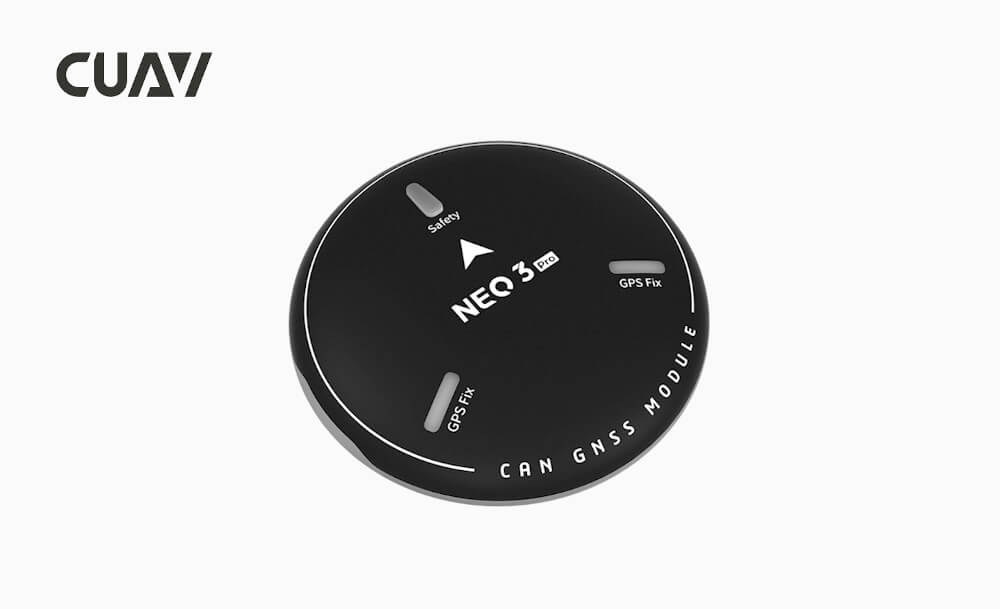
NEO 3 Pro uses a hardware design similar to NEO v2 Pro, and upgrades the GNSS navigation module to the M9N module that supports the four mainstream satellite systems of Beidou, GPS, Galileo, and Glonass. The positioning accuracy has been significantly improved. It is a high Cost-effective unmanned system positioning and navigation module. It integrates a compass, a barometer, a flight controller status light, a buzzer, and a safety switch in one; it has the characteristics of high sensitivity and strong anti-interference.

 Note

Ardupilot 4.0/PX4 1.13.0 and above support NEO 3Pro.

Product features

  • Integrated Ublox latest generation GNSS module (NEO-M9N)
  • Support the concurrency of four mainstream satellite systems to adapt to more complex environments
  • Dedicated antenna supporting four major satellite systems
  • UAVCAN standard protocol, high real-time, strong anti-interference
  • Industrial-grade sensor (RM3100), better anti-interference performance
  • High-performance processing unit STM32F412
  • An internal high-precision barometer to meet the needs of different application scenarios
  • An open-source program supports a custom program
  • Adopting the SAW+LNA+SAW double-filter design effectively mitigates the effects of remote control, data transmission, and 4G signals on GPS signal reception.

Key data

 
Annotate
ProcessorSTM32F412
CompassRM3100
BarometerICP-20100
Rgb DriveMCU direct drive
BuzzerPassive buzzer
Safety switchPhysical button
GNSS receiverUBLOX NEO M9N
Number of concurrent GNSS4(Beidou、Galileo、 GLONASS、 GPS)
Frequency bandGPS: L1C/A
GLONASS: L10F
Beidou: B1I
Galileo: E1B/C
GNSS Augmentation SystemSBAS: WAAS, EGNOS, MSAS
QZSS:L1s(SAIF),
Other: RTCM3.3
Horizontal accuracy2.0M
Speed accuracy0.05M/S
Nav. update rate25Hz(Max)
Number of Satellites32+
AcquisitionCold start24S
Hot start
2S
Aided start:2s
Number of satellites(MAX)32+
SensitivityTracking and nav-167dBm
Cold start Hot star-148dBm
Reacquisition -160dBm
ProtocolDronecan
Wave filteringSAW+LNA+SAW
Anti-Electromagnetic/radio frequency interferenceEMI+RFI
Upgrade firmwaresupport
Supported flight controllerCUAV series, Pixahwk series
Port TypeGHR-04V-S
Input voltage4.7-5.2V
Operating temperature-10~70℃
Size60*60*16MM
Weight33g
  • NEO 3 Pro level accuracy when the SBAS enhancement system is turned on, the nominal accuracy is 1.5m (default); when the SBAS enhancement system is turned off, it is 2.0m
  • NEO 3 Pro supports RTCM3.3 injection, but does not support RTCM output; it can achieve pseudorange differential (meter-level positioning) but does not support carrier phase differential (RTK), and it needs a base station that supports RTCM3.3 output.

Connection to V5+

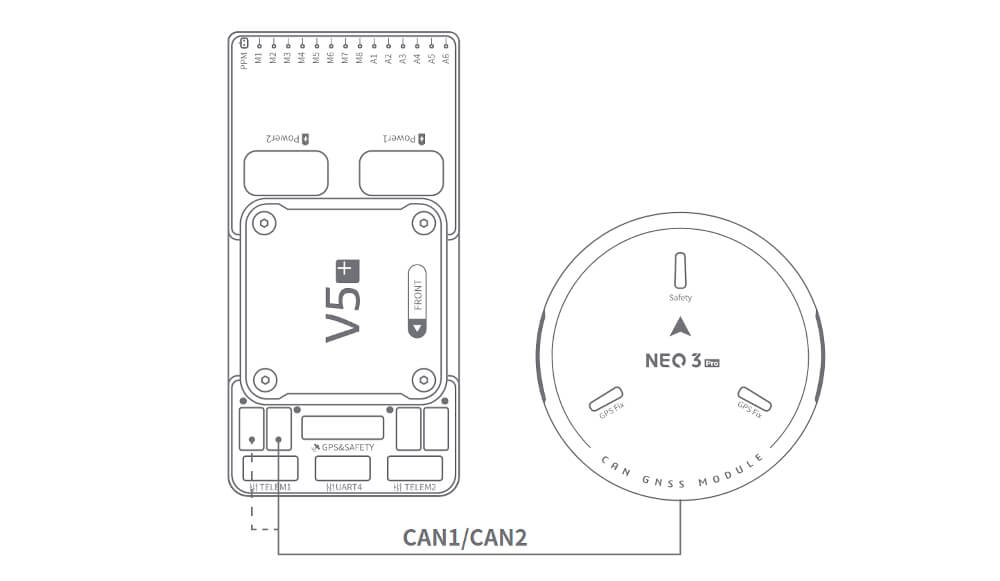
  • Please connect it to the flight control CAN1 / CAN2 interface (CAN1 is recommended)

NOTE: The connection of other PIX flight controllers is the same.

Enable

You need to set flight control parameters to enable Neo V2 pro; there are different setting methods according to the flight control firmware.

ArduPilot firmware

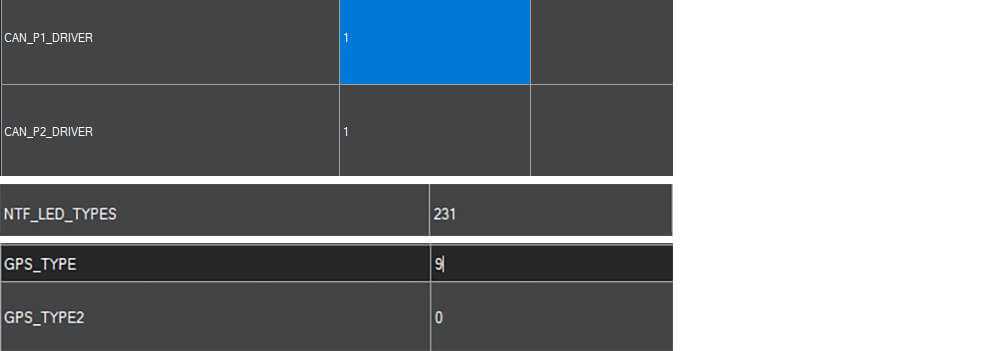
Set the following parameters in all parameter tables of Mission planner and restart after writing

  • CAN_P1_DRIVER set to 1.
  • CAN_P2_DRIVER set to 1.
  • NTF_LED_TYPES set to 231.
  • GPS_TYPE set to 9.

PX4 firmware

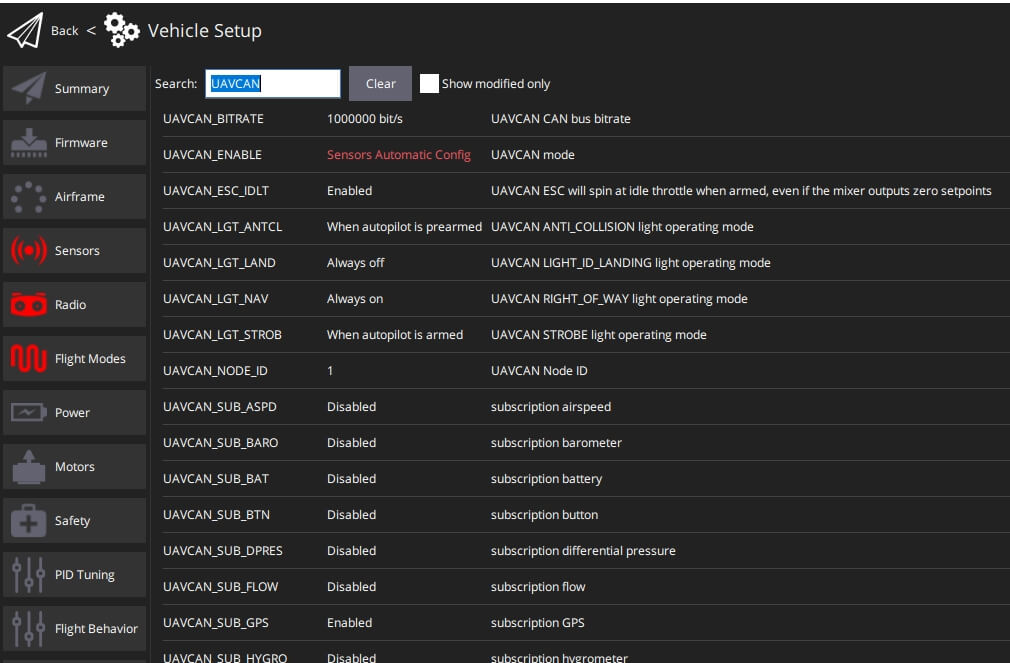
Open QGroundControl>Parameters and modify the following parameters

  • UAVCAN_ENABLESet to Sensors Automatic config .
  • UAVCAN_SUB_GPS Set to Enable.

More info

debug and upgrade firmware

This article will describe how to debug and upgrade the firmware of NEO V2 Pro.

NOTE: This tutorial is based on SLCAN, the protocol is already supported in Ardupilot firmware; PX4 firmware is not supported at this time.

  • Please connect the NEO V2 pro to the flight control CAN1 interface.
  • Open the mission planner and connect the flight controller.

Modify the following parameters in all parameter tables of the mission planner

for CUAV V5+/nano:

  • CAN_SLCAN_CPORT set to 1
  • Serial7_protocol set to 22
  • Reboot flight control

NOTE: CUAVV5 / NANO / FMUV5 flight control AP4.0 / AP4.0 firmware will have two usb driver ports, one is flight control mavlink output port and one is slcan port; if there are no two ports, please uninstall the driver and reinstall)

For Pixhack series / FMUv2 / FMU V3 / FMU V4 flight control

  • CAN_SLCAN_CPORTSet to 1
  • CAN_SLCAN_TIMEOUTSet to 130000
  • CAN_SLCAN_SERNUM Set to 0
  • Please do not reboot the flight control until your operation is complete.

NOTE: STM32F4 does not support dual virtual USB ports, so the flight control using STM32F4 processor can only be used for SLCAN after MAVlink transmission is closed; after the above settings, USB becomes SCLAN port; MAVlink transmission will resume after restart.

Debug

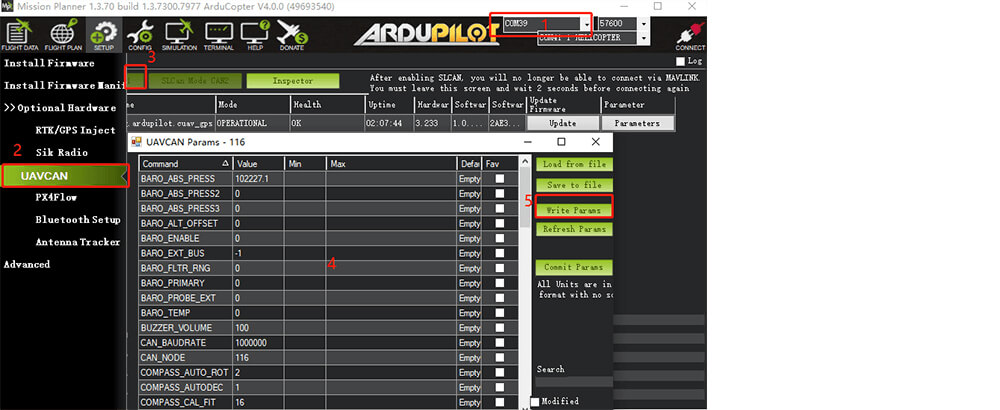
Ardupilot supports setting UAVCAN settings through Slcan, such as modifying node ID, enabling / disabling barometer, etc.

Enable barometer

  • Baro_enable=1(0:disable
  • Reboot

Modify device ID

  • Modify the CAN_NODE parameter

Upgrade firmware

[method one:

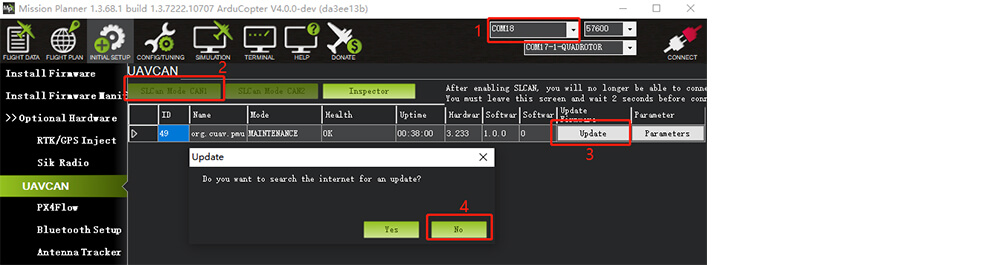
Firmware upgrade using Mission Planner

Firmware download

  • Select the device port corresponding to slcan.
  • Click “slcan mode CAN1” on the UAVCAN interface.
  • Click “Update”, select NO in the pop-up prompt box (yes is to select online firmware; No select local firmware)
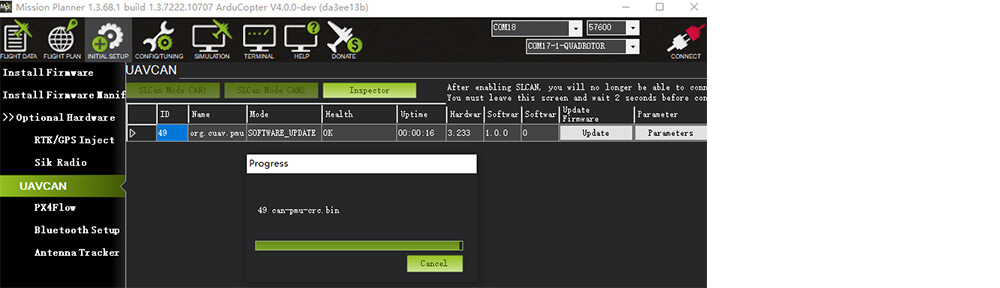
  • Select the firmware file
  • Wait for the writer to complete

Method two:

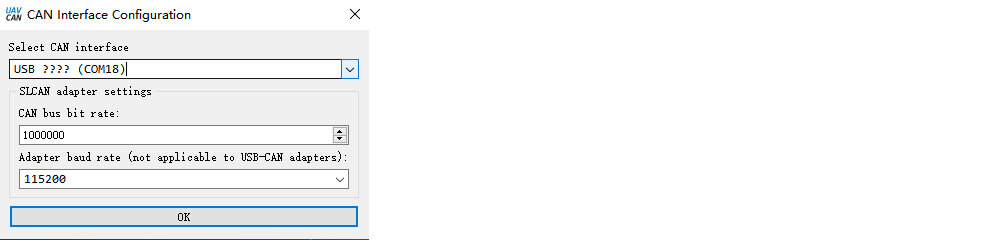
Upgrade with the UAVCAN GUI TOOL software

UAVCAN GUI TOOL download

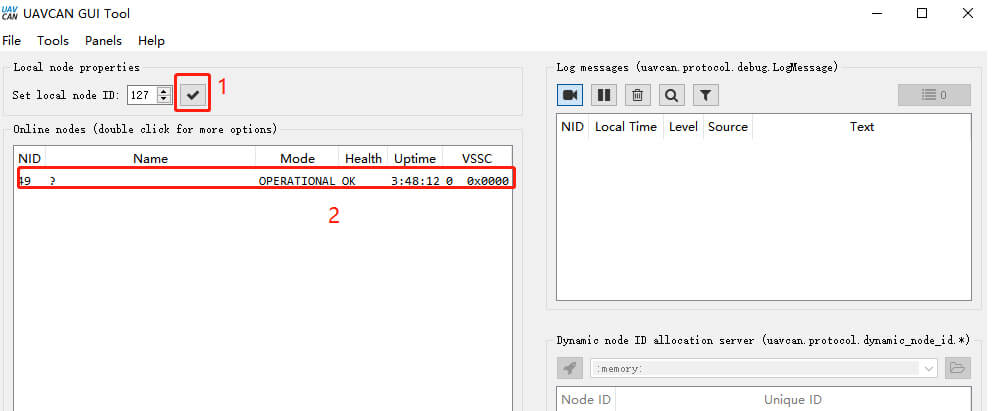
  • Select the device port corresponding to slcan and click “ok”
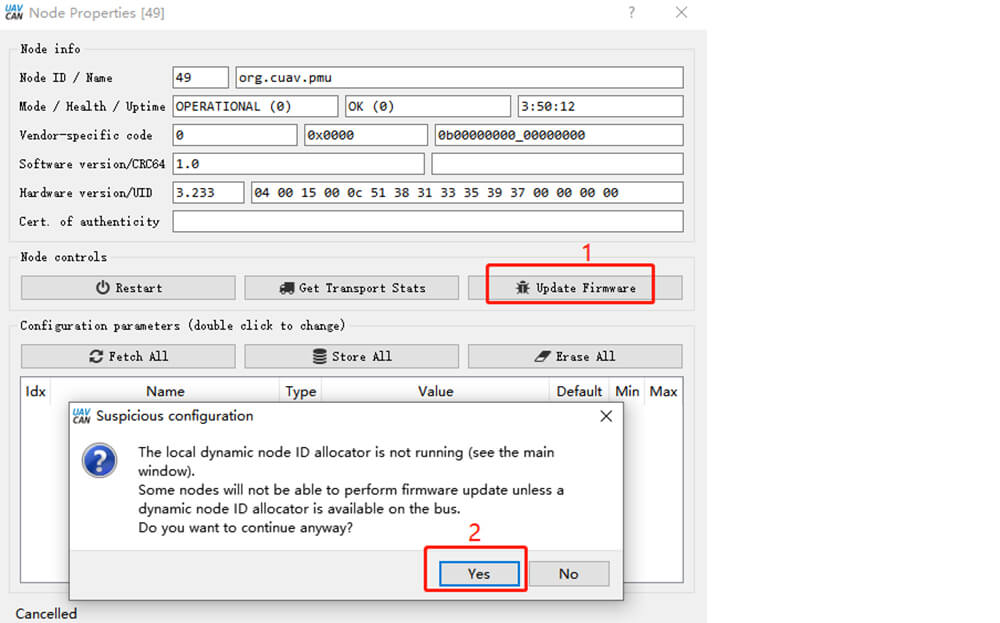
  • Click “√”; then double-click on the device information (marked in Figure 2 below)
  • Click “update firmware”, the message box will pop up “yes.”
  • The mode/health/uptime entry becomes “Software_update.”
  • Waiting for firmware write to complete

Procurement/Purchasing Communication

Laura

E-mail:Laura@cuav.net

WhatsApp:(+86)18078814327

Tina

E-mail:Tina@cuav.net

WhatsApp:(+86)18122367332