NEO 4 Nano – Technical Specifications and Connection Guide

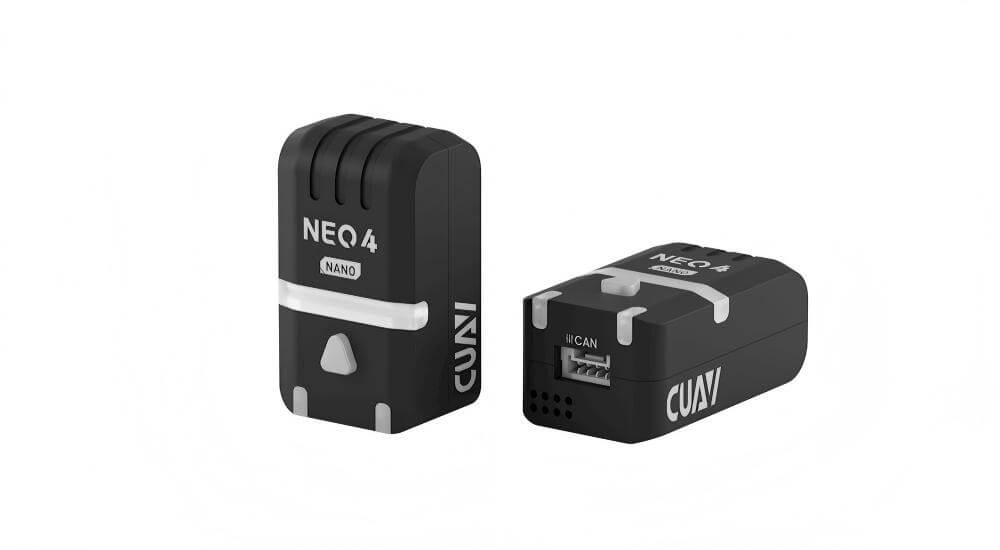
The NEO 4 NANO is a miniature satellite navigation receiver module. It features a highly integrated, compact design incorporating the u‑blox M10 GNSS receiver, supporting concurrent reception of signals from four major global navigation satellite systems. Equipped with a high‑performance STM32H5 processor and an ST IIS2MDC electronic compass, it delivers precise positioning with excellent anti‑interference capabilities and environmental adaptability. It supports an RGB status LED indicator and uses the CAN bus protocol, making it suitable for a wide range of unmanned system applications.

NEO 4 Nano GNSS Module

 Note

ArduPilot firmware version 4.0 and later fully supports the NEO 4 NANO.

Data Sheet

Item
Details
Receiver Typeu-blox MIA-M10Q
ProcessorSTM32H5 Arm® Cortex®-M33 250 MHz
CompassIIS2MDC
Frequency BandGPS: L1 C/A
GLONASS: L1OF
BDS: B1I/B1C
Galileo: E1B/C
Augmentation SystemsSBAS: EGNOS, GAGAN, MSAS, WAAS, BDSBAS, KASS, and SouthPAN
QZSS L1S (SLAS)
Number of Concurrent GNSS4 (BDS, Galileo, GLONASS, GPS)
OscillatorTCXO
AcquisitionCold Start 27s
Hot Start 1s
Aided Start 1s
Nav. Update RateUp to 10 Hz (4-concurrent GNSS)
Up to 25 Hz (single GNSS)
Horizontal Position Accuracy1.5 m CEP
Signal IntegrityRF interference and jamming detection and reporting
Spoofing detection and reporting
Wave FilteringSAW+LNA+SAW+LNA
Anti Electromagnetic / Radio Frequency InterferenceEMI+RFI
ProtocolDroneCAN
Upgrade FirmwareSupport
FirmwareCUAV M4C GNSS
Data InterfaceGHR-04V-S
Size34 × 20 × 14.5 mm
Weight10.6 g
Input Voltage4.5 ~ 5.4 V
Operating Temperature-10 ~ +80 ℃

Size and Pinouts

Connecting to the Controller

  • Connect to the flight controller’s CAN1 / CAN2 port (CAN1 is recommended).

 Tip

The flight controller must support the DroneCAN protocol, such as ArduPilot and PX4 flight stacks.

Enable Neo 4 Nano for ArduPilot stack

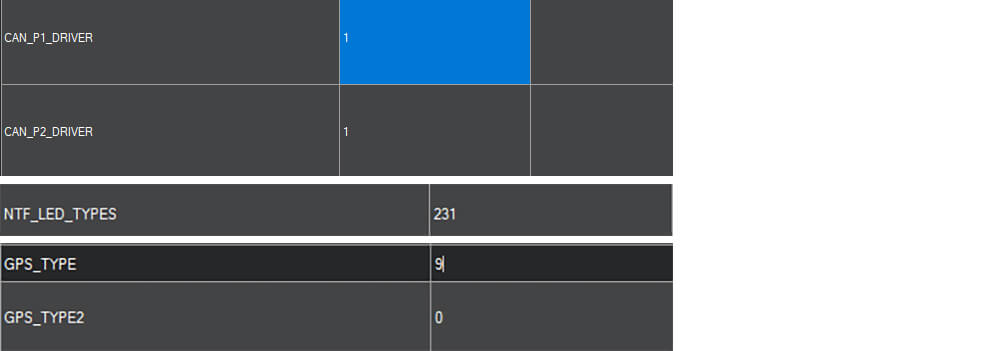
Set the following parameters in the full parameter list of Mission Planner, then restart the controller after saving the settings:

  • Set CAN_P1_DRIVER to 1.
  • Set CAN_P2_DRIVER to 1.
  • Set NTF_LED_TYPES to 231.
  • Set GPS_TYPE/GPS1_TYPE to 9 (when used as GPS1).

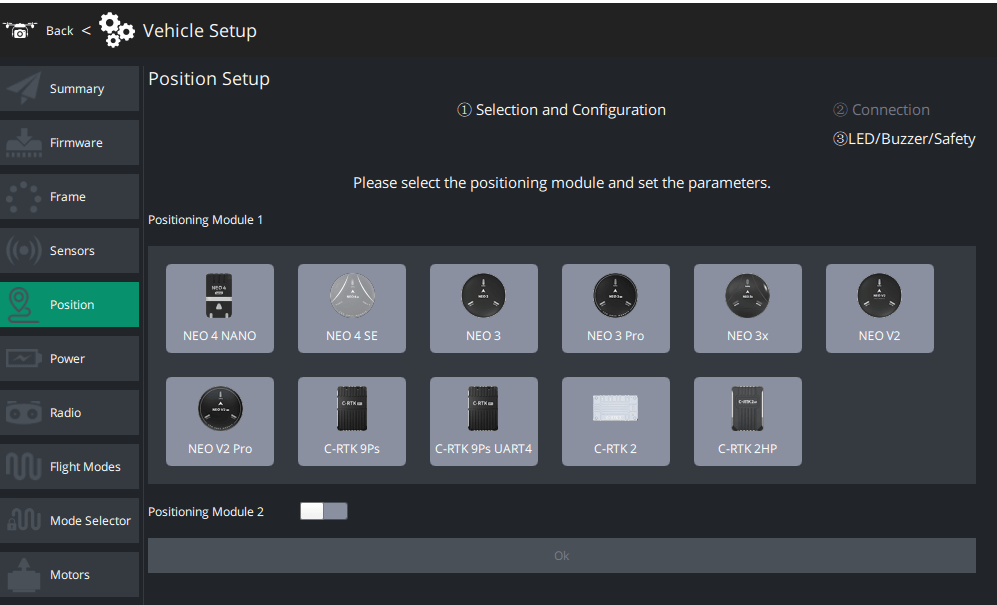
You can achieve a quick configuration without parameter adjustments via the LGC Ground Control Station.

Custom Parameters for Neo 4 Nano

 Tip

Under normal circumstances, there is no need to modify the parameter configuration of the Neo 4 Nano, which supports plug-and-play. If parameter modification is required, use the LGC/Mission Planner for the operation.

Parameter Name
Parameter DescriptionDefault ValueSupplementary Notes
CAN1_FD_BITRATECAN interface FD data bit rate (Mbps)4Consistent with the default value of ArduPilot
CAN1_FD_EN_MODEControls the FD enable mode of the CAN interface2 (Auto CANFD Mode)0 = Disable CANFD; 1 = Force enable CANFD; 2 = Auto enable CANFD when specific conditions are met, and the enabled state remains until power off
CAN_NODE_IDConfigures the DroneCAN node ID of the module00 means automatic allocation by the system
CAN_REnables the CAN terminal resistor or notFalse (Disabled)True = Enable the terminal resistor
FLASH_BOOTLOADERUpdate Bootloader0Set to 1 to update the old Bootloader, and the parameter will automatically revert to 0 after the update is completed
GNSS_ITFM_SENDSends GNSS jamming and spoofing detection data via DroneCAN positioning messages or not0This data is used by PX4; PX4 cannot arm if the signal jamming status is abnormal
GNSS_MODESets the satellite navigation systems to be used (mask format)111Each bit corresponds to a different satellite system; For MIA-M10C, Beidou B1I cannot be enabled at the same time when GLONASS (BIT6) is enabled; Beidou will use the B1C signal when both BIT6 and BIT3 are set
GNSS_RATE_MSOutput cycle of CAN positioning-related messages (ms)2005 outputs per second by default
GPS_TYPECompatible with the parameter setting of APM flight controller2Resolves the issue where the flight controller cannot use DroneCAN positioning messages when APM’s GPS_AUTO_CONFIG is set to 2
RGB_BRIGHTNESSRGB light brightness adjustment100100 means 100% brightness; set to 0 to disable the RGB light

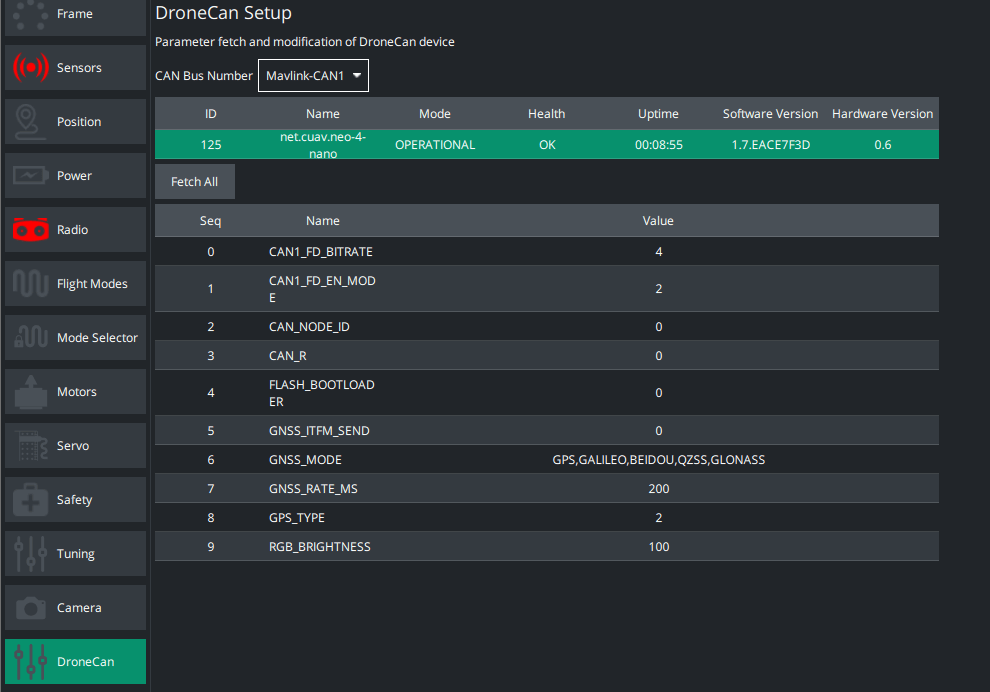
Steps to Modify the Parameter Configuration of Neo 4 Nano via LGC Ground Control Station

  1. Click the LGC icon in the upper right corner and enter the Dronecan interface under the UAV Settings interface.
  2. Select the CAN interface number for hardware connection as the CAN bus number.
  3. Click to select the CAN device to be configured.
  4. Fetch all parameters.
  5. Select the parameter to be modified, enter the target value in the pop-up data box, and click Save.

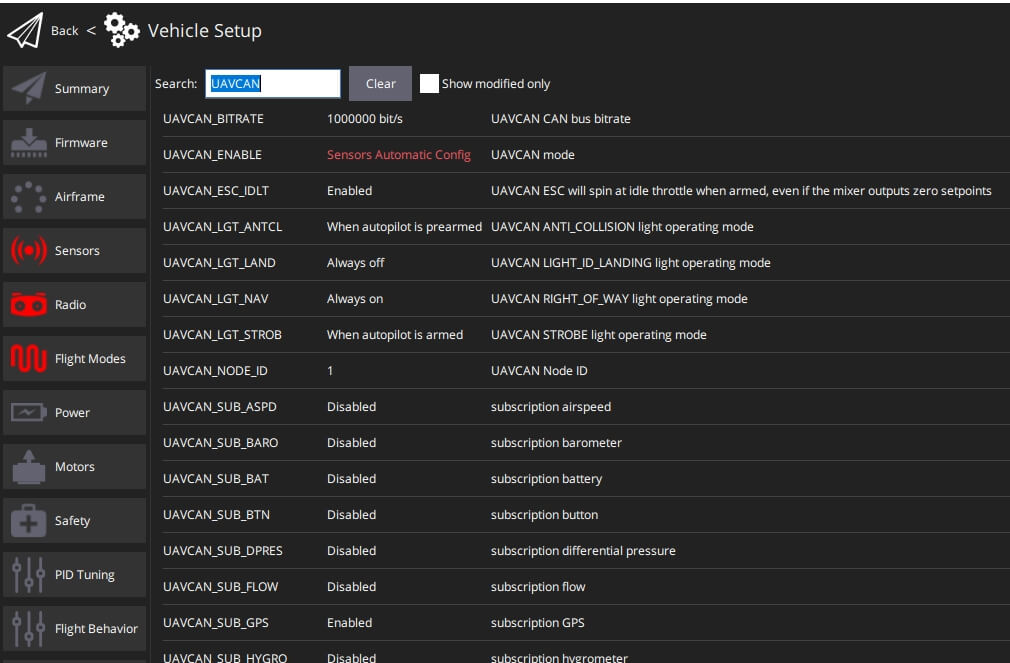
PX4 Firmware

In QGroundControl > Parameters, set the following parameters, write them, and then reboot:

    • UAVCAN_ENABLE set to Sensors Automatic config.
    • UAVCAN_SUB_GPS set to Enable.

Procurement/Purchasing Communication

Laura

E-mail:Laura@cuav.net

WhatsApp:(+86)18078814327

Tina

E-mail:Tina@cuav.net

WhatsApp:(+86)18122367332