Ultimate Guide to 7-Nano Controller: Specs and Wiring Tips

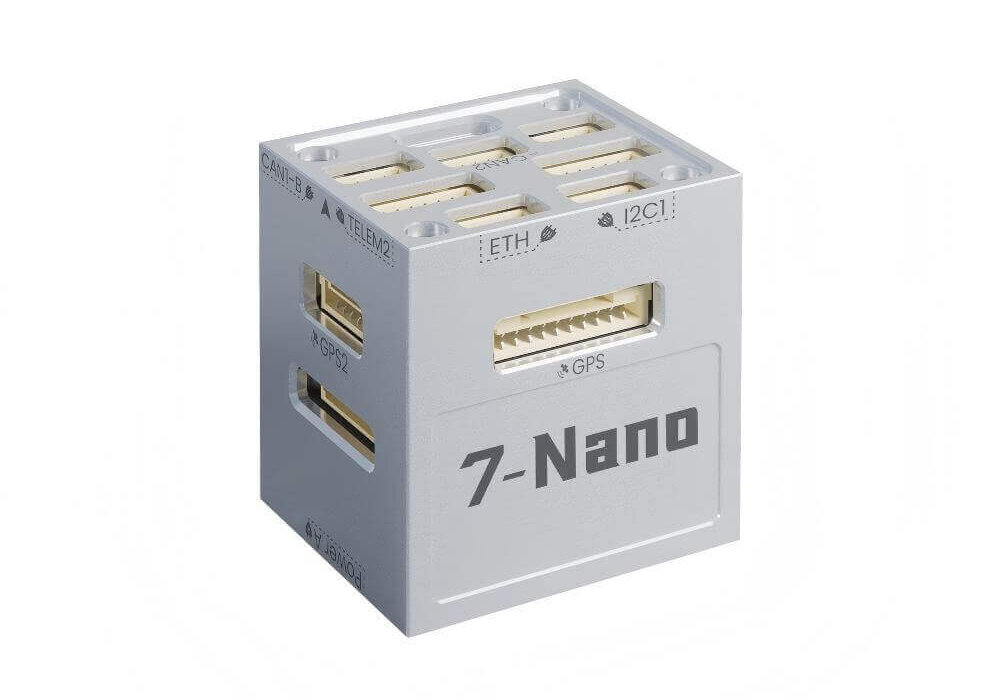
7-Nano is a micro autopilot developed for miniaturized unmanned system equipment. It is independently developed and produced by CUAV. It innovatively adopts a stacked design and integrates a high-performance STM32H7 processor, dual redundant industrial-grade IMU, and rich and complete expansion interfaces in a very small space; it supports Ethernet communication.n The interface can realize the low-latency and large-bandwidth real-time communication requirements of various components of the autopilot and unmanned system equipment.

Feature

  • Dual floating point H7 processor, running frequency up to 480Mhz.
  • Brand new dual industrial-grade IMU redundant design.
  • Innovative stacked design, ultra-small size, full functions, rich interfaces, rich expansion.
  • Integrated Ethernet interface supports communication with onboard computers through network ports.
  • Supports 5V/3.3V PWM configuration output.
  • Perfectly compatible with various models of PX4/ArduPilot.
1

Hardware specifications

7-Nano

  • STM32H753 microcontroller
  • 2 IMUs: IIM42652 and BMI088
  • builtin IST8310 magnetometer
  • 2 barometers: BMP581 and ICP20100
  • microSD card slot
  • USB-TypeC port
  • 1 ETH network interface
  • 5 UARTs plus USB
  • 14 PWM outputs
  • 3 I2C ports
  • 2 CAN ports (two of which share a CAN bus, and one is an independent CAN bus)
  • Analog RSSI input
  • 3.3V/5V configurable PWM output voltage
  • Power System:
    • Power: 4.5~5.4V
    • USB Input: 4.75~5.25V
    • Servo Rail Input: 0~10V
    • 4.5 ~ 5.5V Operating Voltage
  • Weight and Dimensions:
    • Weight: 33.8g
  • Operating temperature
    • -20 ~ 85°c

7-Nano PDB

  • Operating Voltage:12-70V
  • Detection current(MAX):79.2A
  • Bec out:5.3V/4A
  • Voltage and current accuracy:±0.2V/0.5A
  • Splitter: Divided into six
  • Sport:XT60/GH1.25 6Pin
  • Weight:17g

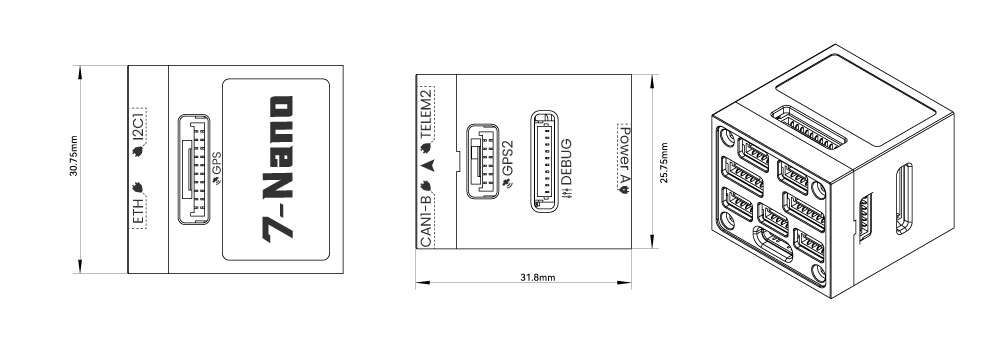
7-Nano size

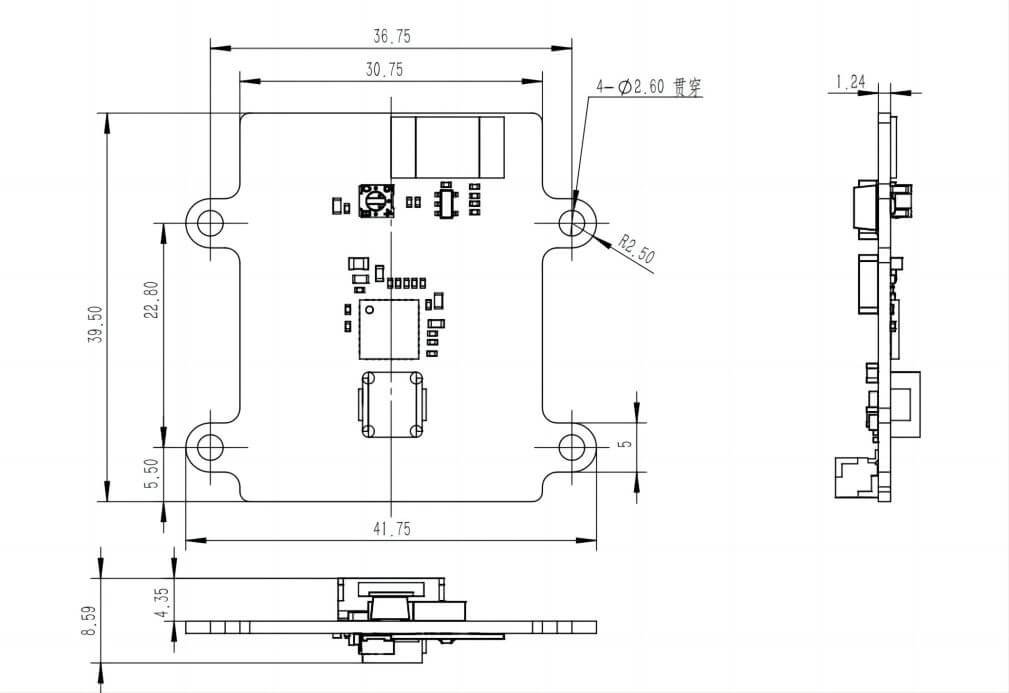
PDB size

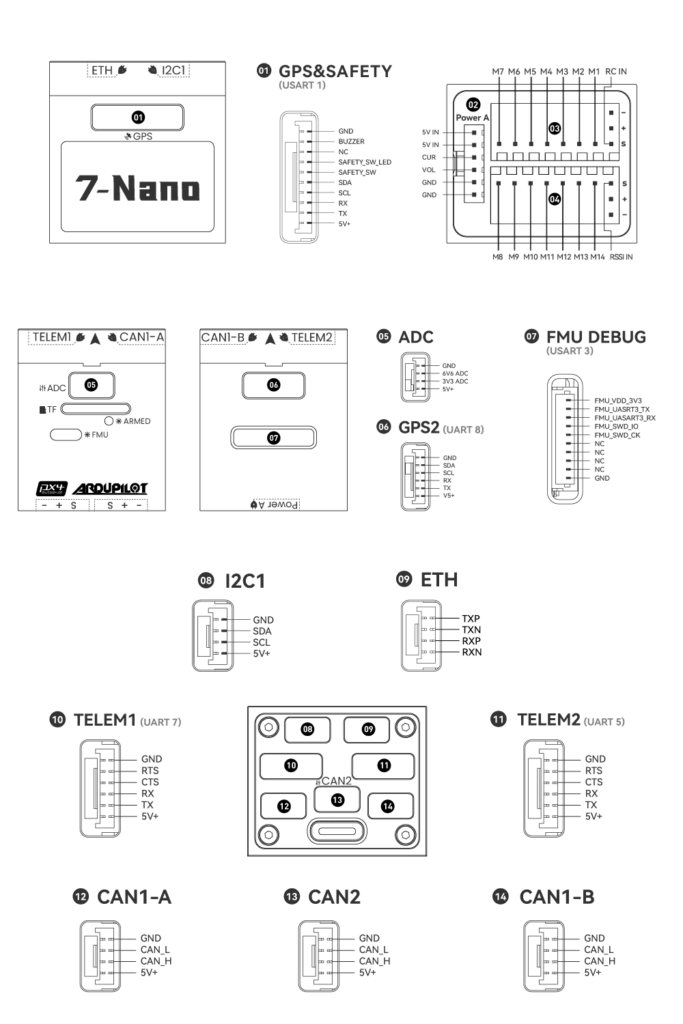
Pinouts

Firmware

You can choose to use ArduPilot (recommended)/PX4 firmware.

7-Nano Controller Wiring Quick Start

This quick start guide shows how to power the 7-Nano flight controller and connect its most important peripherals.

Wiring Chart Overview

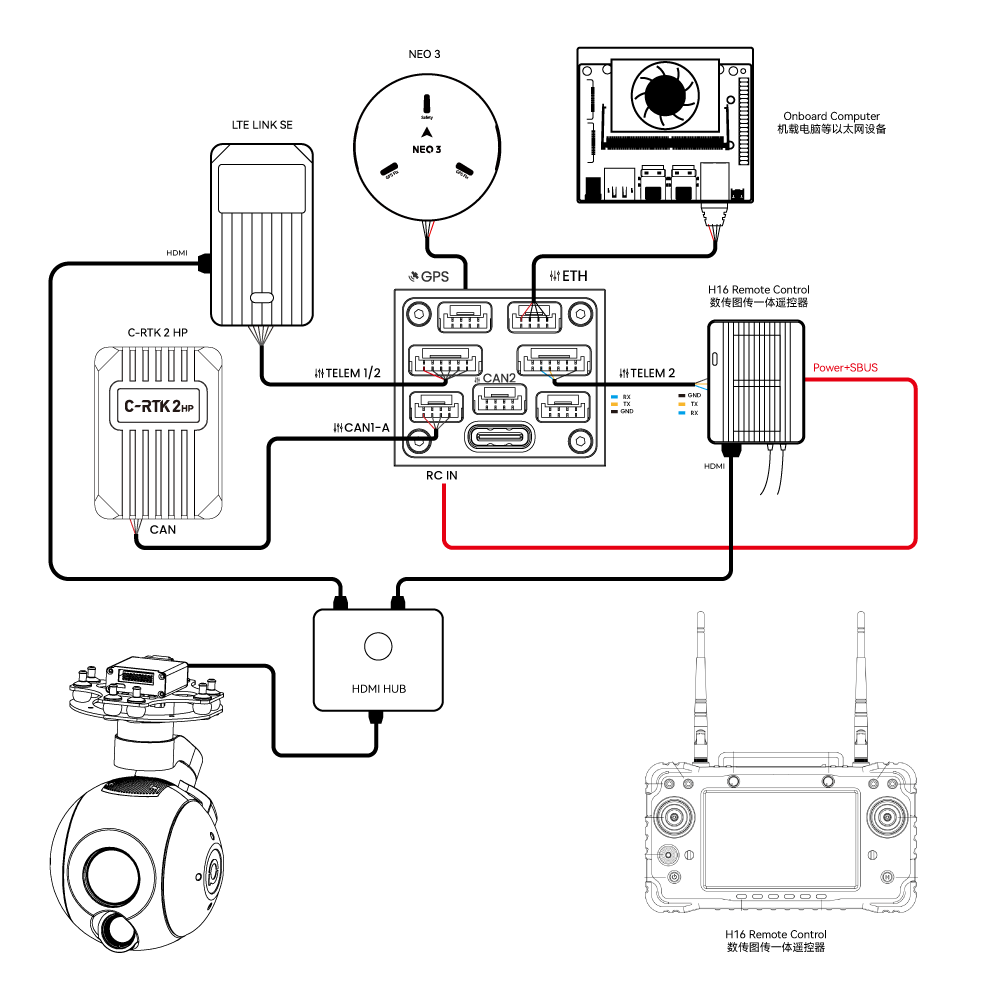
The image below shows how to connect the most important sensors and peripherals (except the motor and servo outputs). We’ll go through each of these in detail in the following sections.

The image below shows the most important peripheral connections of the 7-Nano.

Main interface

Function and purpose

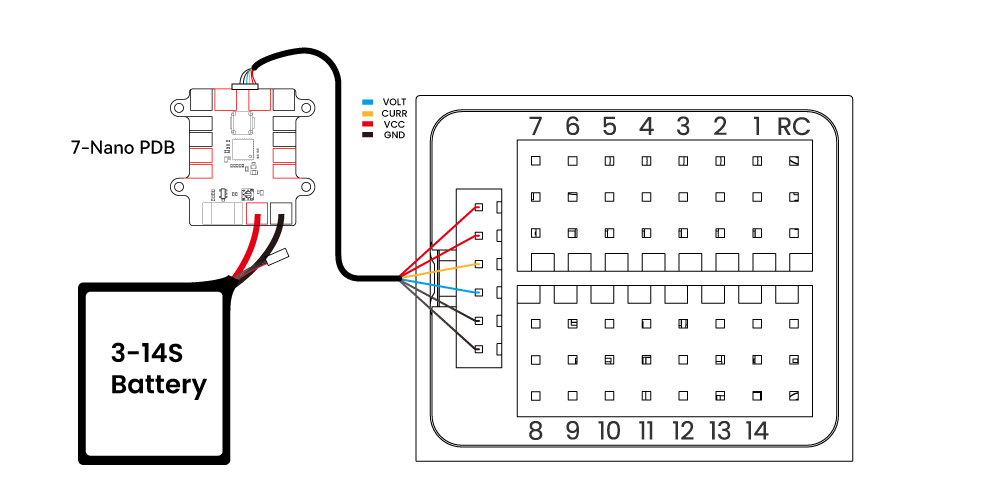
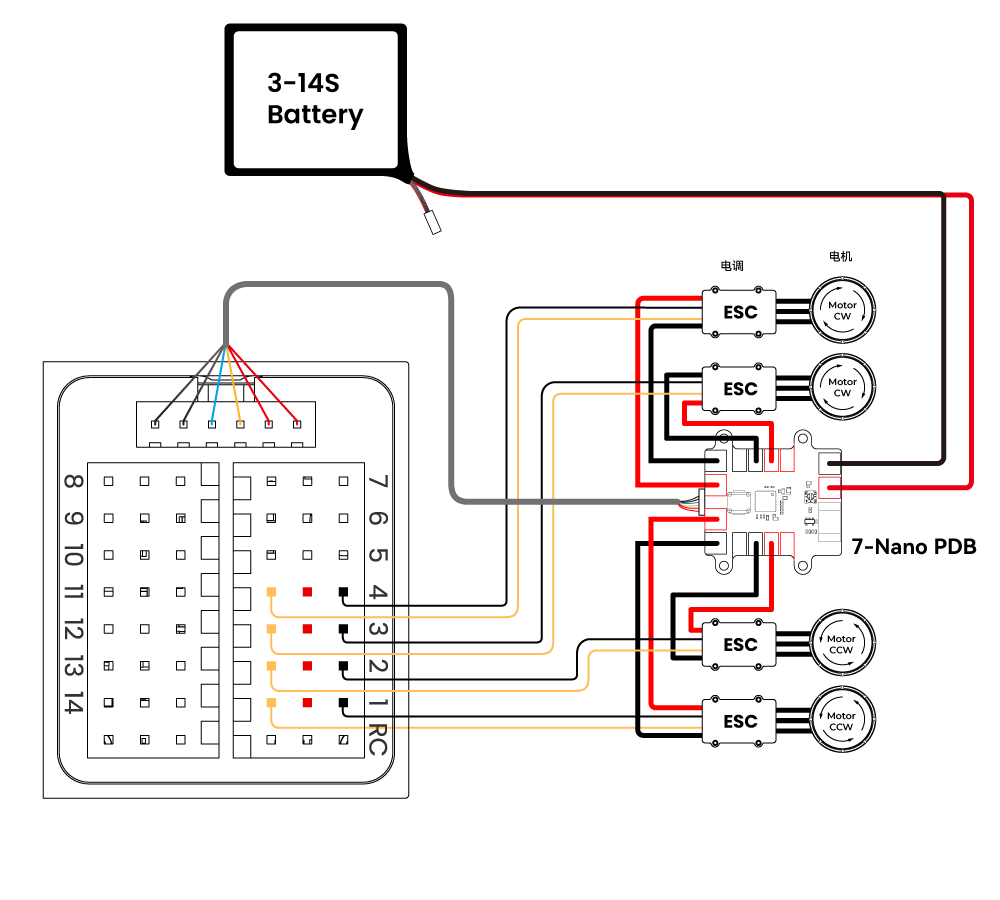
POWER AConnects to 7-Nano PDB; has power input & AD voltage and current detection function
M1~M14PWM signal output port, which can be used to control motors or servos; and M1~M8 can be configured as 5V PWM
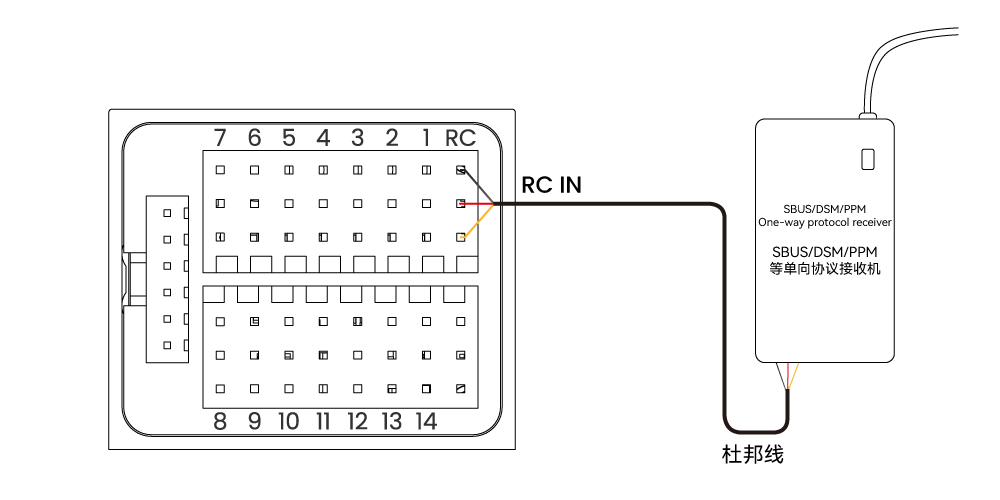
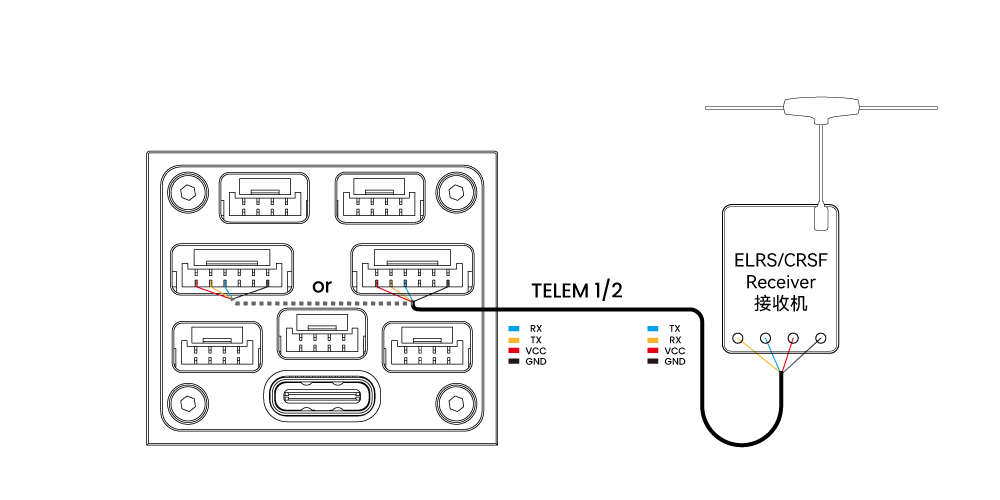
RC INConnect remote control receivers with one-way protocols such as SBUS/DSM/PPMD (ELRS/CRSF receivers should be connected to any serial port, not RCIN)
RSSIUsed to connect the signal strength backhaul module
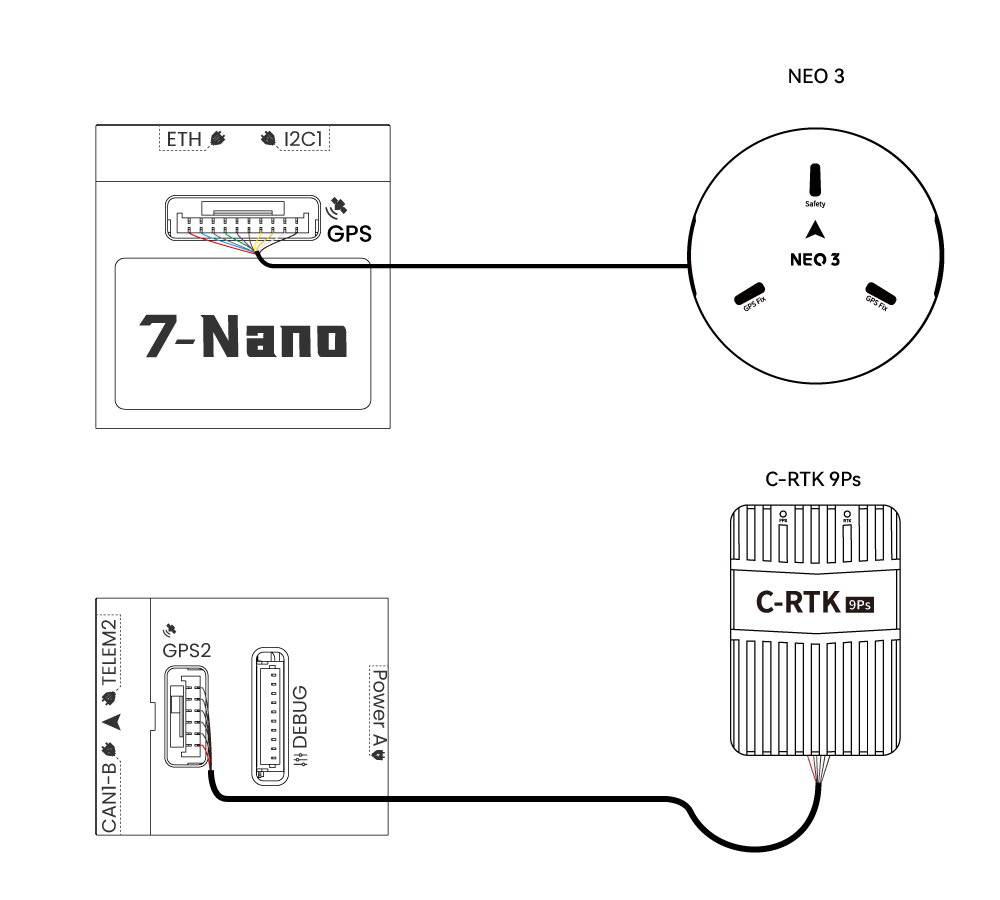
GPS&SAFETYConnect to the Neo series GPS or C-RTK series RTK (it includes GPS, safety switch, and buzzer interfaces)
GPS2Can be used to connect to GPS/RTK
DEBUGUsed for FMU chip debugging, reading DEBUG device information, and can be configured for other serial port purposes for Ardupilot
ADCContains ADC3.3 and ADC6.6, which can be used for analog-level signal detection
TF CARDInsert an SD card to realize the log storage function
ETHAn Ethernet interface can be used to connect Ethernet devices, such as accompanying computers.
I2CConnect to I2C devices, such as external compasses, for communication between the flight control and the I2C devices.
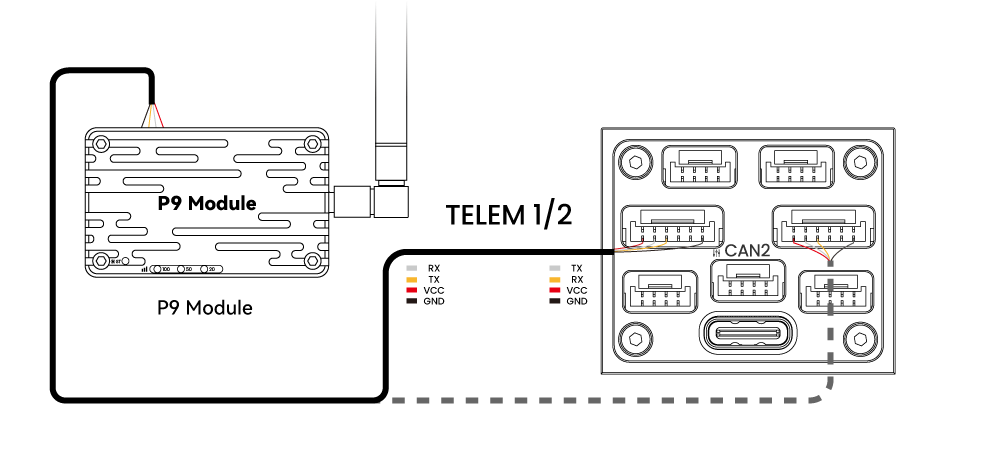
TELEM1/TELME2Connect data transmission, etc., used for MAVLINK interactive data
CAN1-A/BCAN1 port, connected to UAVCAN equipment such as CAN GPS, used for communication between the flight control and UAVCAN equipment (such as connecting NEO3 pro UAVCAN GPS)
CAN2Connect to UAVCAN devices such as CAN GPS for communication between flight control and UAVCAN devices (such as connecting NEO3 pro UAVCAN GPS)
TYPE CThe flight controller USB interface can connect to the ground station, burn firmware, and perform other operations

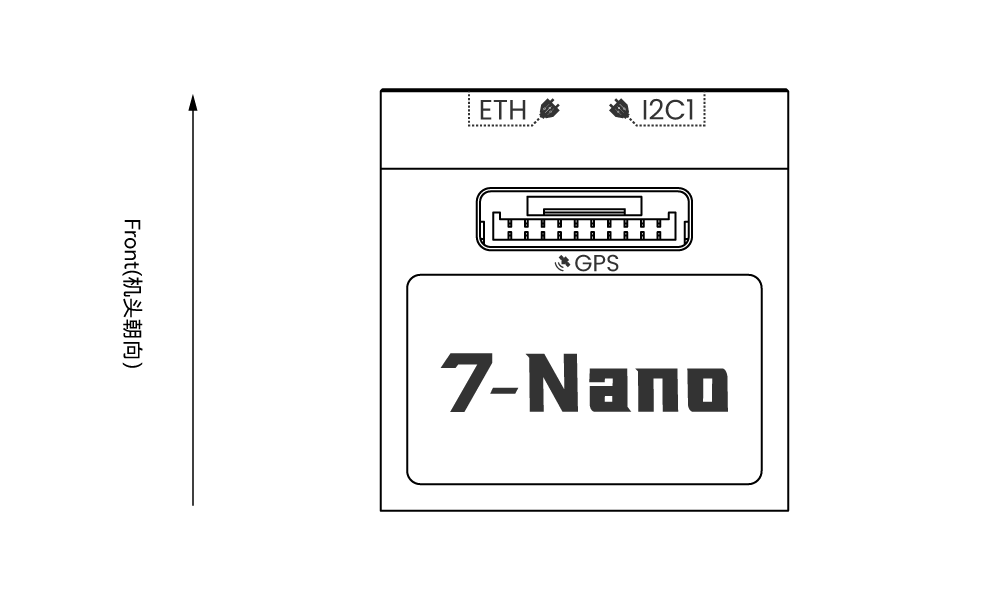
Vehicle Front

 Note

The default arrow points to the front of the aircraft. Make sure the arrow points to the front of the frame during installation. If the flight controller is not installed in the recommended/default orientation (e.g. space constraints), you need to configure the flight controller orientation (PX4 firmware click here, Ardupilot firmware click here).

GPS

If you use Drone GPS, you should connect to the CAN1/CAN interface and modify flight controller parameters for NEO 3GPS. If you are using it on an aircraft over 10kg, it is recommended that you use C-RTK 2HP or C-RTK 9Ps with a heading message (using heading instead of compass); to solve compass interference and avoid complicated calibration procedures, it is plug-and-play use.

Safety switch & buzzer

 Note

When you use NEO series GPS, there is no need to install additional safety switches and buzzers.

If you are flying without GPS, you connect the switch directly to the GPS1 port to be able to unlock and fly the drone. (If you use the old 6-pin GPS, please check the interface definition at the bottom to change the wiring.)

Remote control receiver

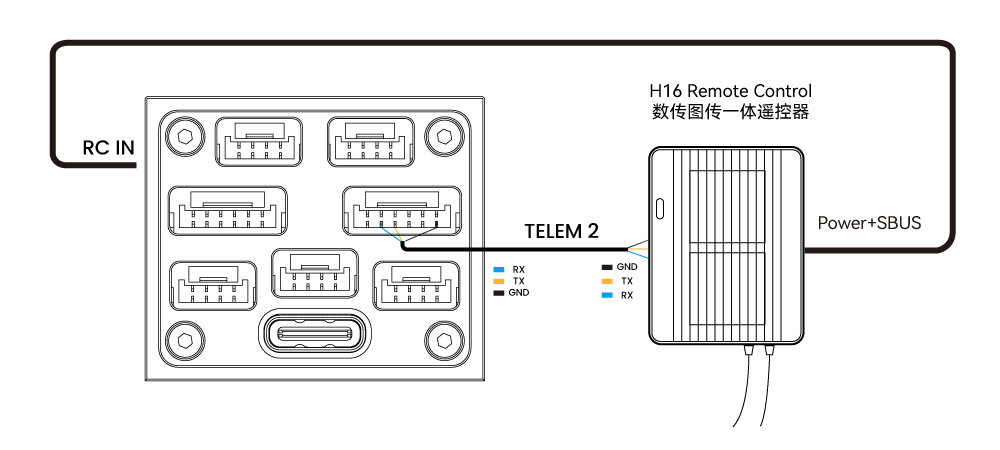
For your flight safety, it is recommended that you connect the handheld remote control, whether flying manually or automatically (it can be used as an emergency rescue aircraft, unless you are not proficient in operating the handheld remote control). Different remote controls and receivers have different connection methods:

Android remote control. Take H16 as an example:

  • Connect 7-Nano TELEM1/TELEM2 to the H16 remote control UART0 port and connect the H16 SBUS pin to the RC pin on the side of the 7-Nano.

unidirectional RC protocols(SUBS/DSM/PPM)

  • Use Dupont cable to connect to the RCIN interface; no additional parameter settings are required.

ELRS/CRSF Receiver

  • Connect the ELRS/CRSF receiver to any UART serial port of 7-Nano (such as TELEM2), and modify ArduPilot (or PX4 parameters

 Note

Only one remote control receiver needs to be connected, multiple receivers are not supported.

Power

7-Nano is equipped with a 7-Nano PDB module, which supports 12~70V input. Please connect the 6-pin connector of the module to the flight control Power A interface.

 Note

ArduPilot firmware has configured parameters by default, and you do not need to configure the battery detector on the software.

Telemetry (data transmission) system

Using the telemetry system, you can communicate with the drone through the ground station software. Monitor and control drones in flight. The airborne end of the telemetry system should be connected to the TELEM1/TELEM2 interface.

SD

The SD card is already installed when 7-Nona leaves the factory; you do not need to install it.

Motor

The motor/servo system is connected to the M1~M14 interface in the order specified for your carrier aircraft in the airframe reference.

Servo power supply

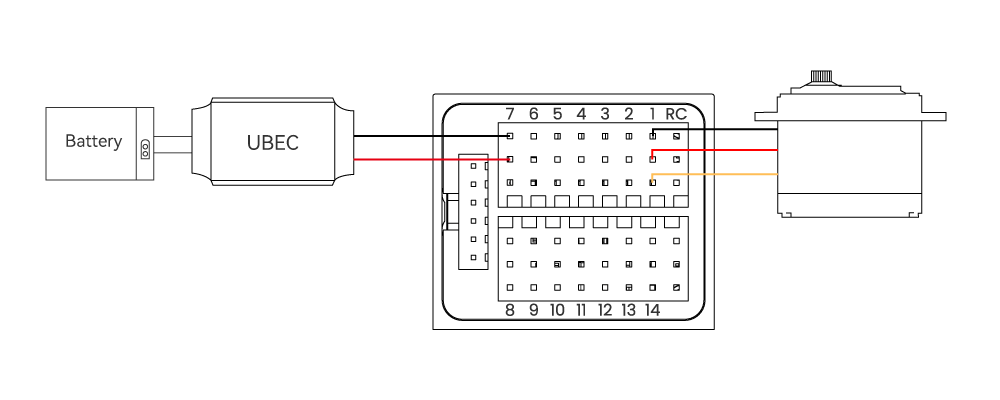
The 7-Nano servo interface is completely isolated from the internal power supply of the flight control. The flight control will not power the servo. If you need to power the servo, please connect the BEC to any positive and negative stage of M1~M14 (M1~ The positive and negative of M14 are connected); then connect the servo.

7-Nano compared with other models

Projects 7-Nano V5 Nano Pixhawk V6X X7+
Main processor STM32H753 STM32F765 STM32H753 STM32H743
Number of sensors Dual redundant IMU Triple redundant IMU Triple redundant IMU Triple redundant IMU
Compass IST8310 IST8310 RM3100 RM3100
Barometer BMP581
ICP20100
MS5611 ICP-20100
ICP-20100
MS5611
MS5611
PWM output 14 11 16 14
Built-in shock absorption Patented shock absorption Patented shock absorption
Ethernet Supported Not supported Supported Not supported
Power port 1 1 4 2
Size 30.75×31.8×25.75mm 60x40x14mm 90.13×44.95×29.24mm 77×45.539mm
Weight 33.8g 50g 99g 101g
Design Features Laminated Design
Mini Size
Integrated
Mini Size
Pixhawk Standard
High Performance
Modular Design
High Performance

Procurement/Purchasing Communication

Laura

E-mail:Laura@cuav.net

WhatsApp:(+86)18078814327

Tina

E-mail:Tina@cuav.net

WhatsApp:(+86)18122367332