Pixhawk V6X Controller: Complete Setup & Pin Guide

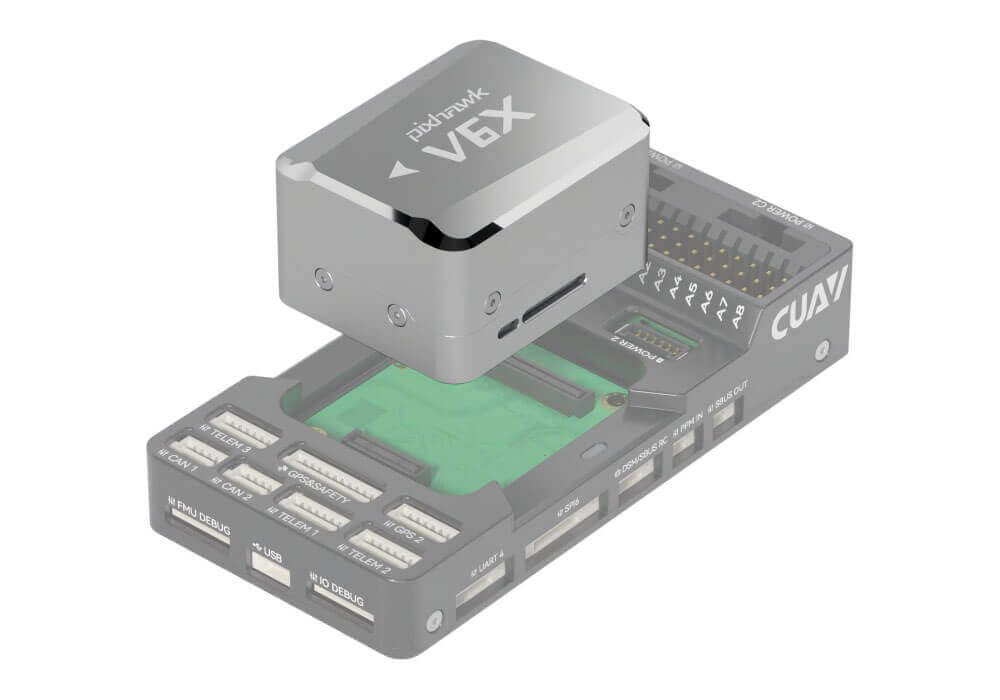
Pixhawk V6X® is a new generation of Pixhawk® designed by CUAV and PX4. It is based on the Pixhawk FMU V6X standard design and pursues the ultimate safety and stability. It features an H7 double-precision floating-point unit and a Cortex-M3 coprocessor, an independent bus and power supply, a triple-redundant IMU, IMU temperature factory pre-calibration technology, and a dual-redundant barometer design, ensuring the safe operation of unmanned system equipment and offering rich expansion capabilities. It integrates a 100M Ethernet PHY and can communicate with mission computers (onboard computers), high-end mapping cameras, and other airborne equipment at high speed to meet the needs of high-end unmanned system equipment.

 Note

Pxiahwk v6X is a pure hardware product; the firmware and program are provided by ArduPilot/PX4 or developed by the user; it is suitable for various unmanned system equipment (such as unmanned ships/submersibles, etc.).

Feature of product

  • Official original Pixhawk FMU v6X standard
  • H7 double-precision floating-point (CPU&FPU) processor
  • 3 IMUs with independent bus and independent power supply
  • High-performance, low-noise automotive-grade IMU
  • 100M Ethernet port

Quick Summary

  • FMU Processor: STM32H753
    • 32 Bit Arm® Cortex®-M7, 480MHz, 2MB flash memory, 1MB RAM
  • IO Processor: STM32F100
    • 32 Bit Arm® Cortex®-M3, 24MHz, 8KB SRAM
  • On-board sensors:

    • Accelerometer/Gyroscope: BMI088
    • Accelerometer/Gyroscope: ICM42688-P
    • Accelerometer/Gyroscope: ICM20649
    • Magnetometer: RM3100
    • Barometer: ICP-20100
  • Interfaces:

    • 16 PWM servo outputs(M1~M8 form IO;A1~A8 form FMU)
    • 1 Dedicated R/C input for PPM
    • 1 Dedicated R/C input for Spektrum / DSM and S.Bus with analog / PWM RSSI input
    • 3 TELEM Ports(with full flow control)
    • 1 UART4
    • 2 GPS ports
      • 1 full GPS plus Safety Switch Port(GPS1)
      • 1 basic GPS port(with I2C,GPS2)
    • 2 USB Ports
      • 1 TYPE-C
      • JST GH1.25
    • 1 Ethernet port
      • Transformerless Applications
      • 100Mbps
    • 1 SPI bus
      • 2 chip select lines
      • 2 data-ready lines
      • 1 SPI SYNC line
      • 1 SPI reset line
    • 2 CAN Buses for CAN peripheral
      • CAN Bus has individual silent controls or ESC RX-MUX control
    • 4 power input ports
      • 2 Dronecan/UAVCAN power inputs(MOLEX 1511000006)
      • 2 SMBUS/I2C power inputs(MOLEX 5055680681-5055650601)
    • 1 AD & IO port
      • 2 additional analog input(3.3 and 6.6v)
      • 1 PWM/Capture input
    • 2 Dedicated debug
      • FMU debug
      • IO debug
  • Electrical data
    • Voltage Ratings:
      • Max input voltage: 5.70V
      • USB Power Input: 4.75~5.25V
      • Servo Rail Input: 0~9.9V
    • Current Ratings:
      • Telem1 and GPS2 output current limiter: 1.5A
      • All other ports combined output current limiter: 1.5A
        • Weight
        • Flight control:99g
        • Core Module:43g
        • Baseboard: 56g

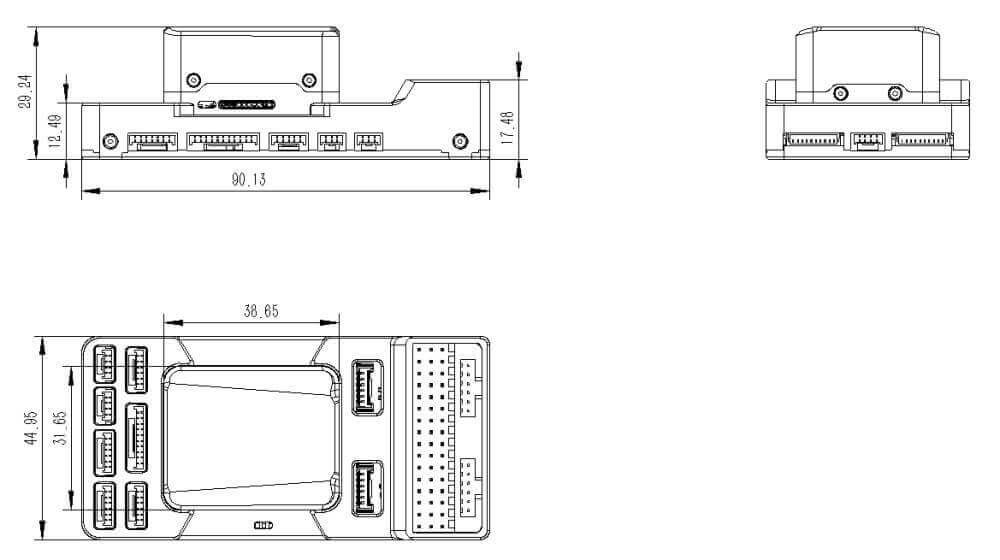
Size

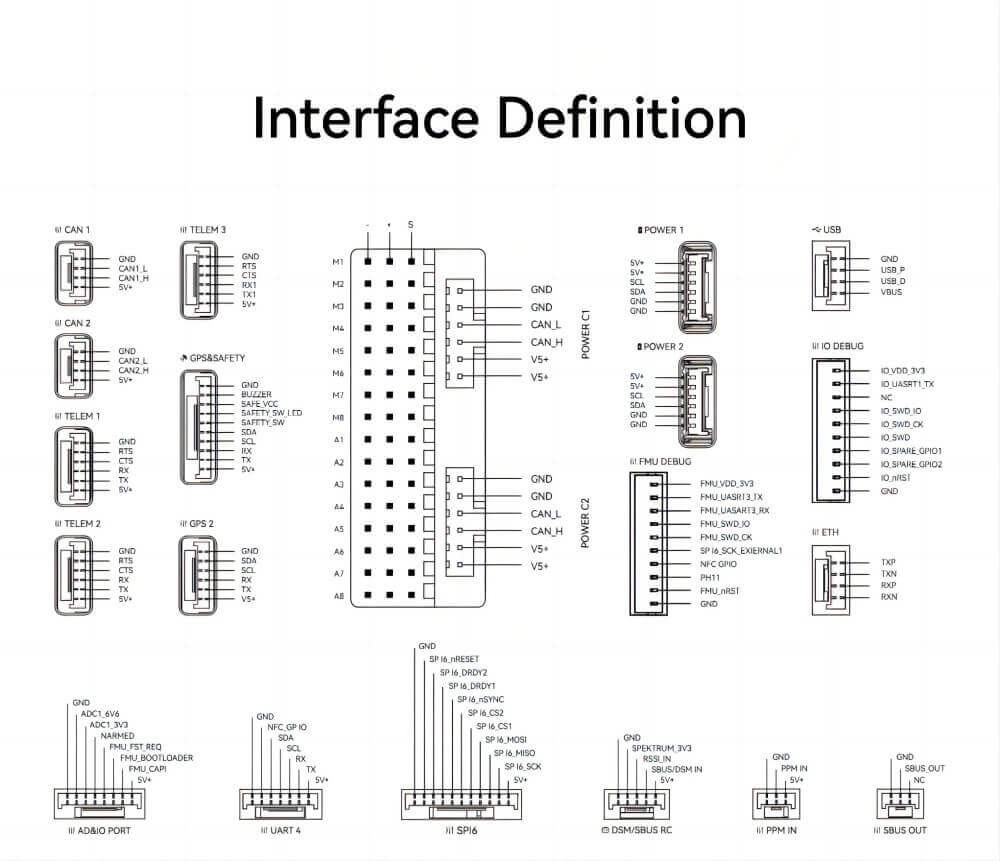
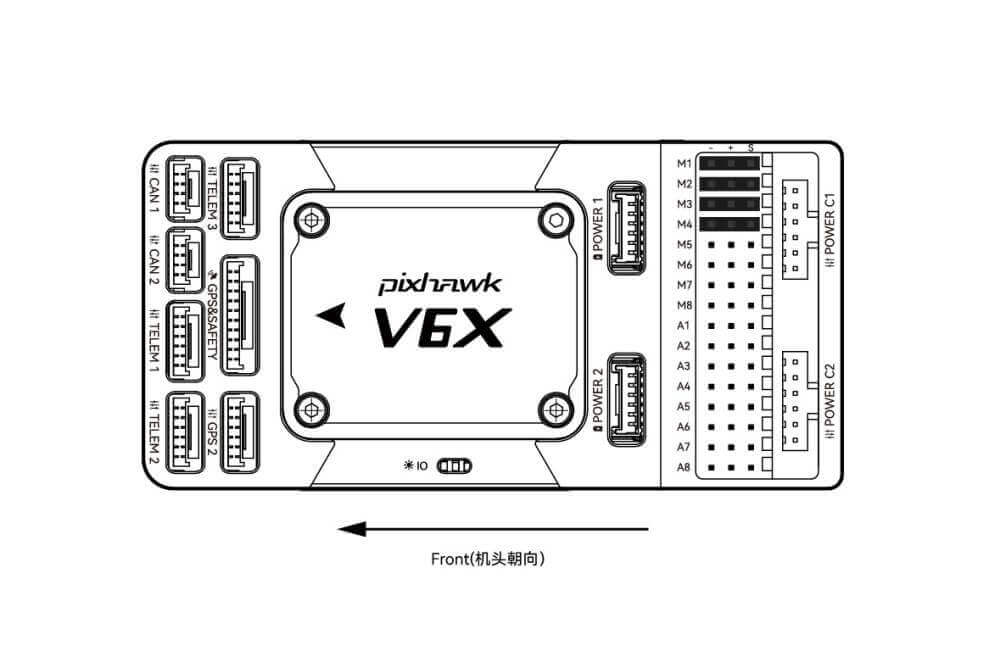
Pinouts

Pixhawk v6x Wiring Quick Start

This quick start guide shows how to power the Pixhawk V6X® controller and connect its most important peripherals.

This article only describes the hardware connection; you may also want to read the following chapters.

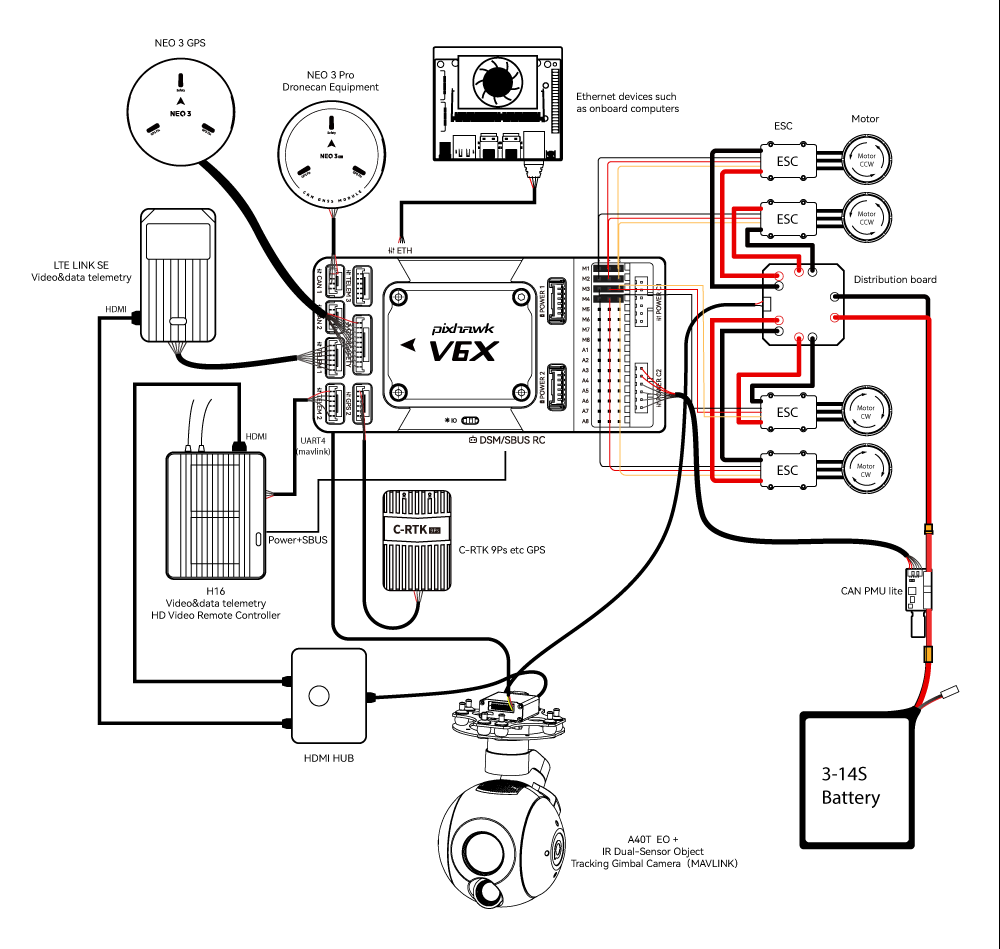
Wiring Chart Overview

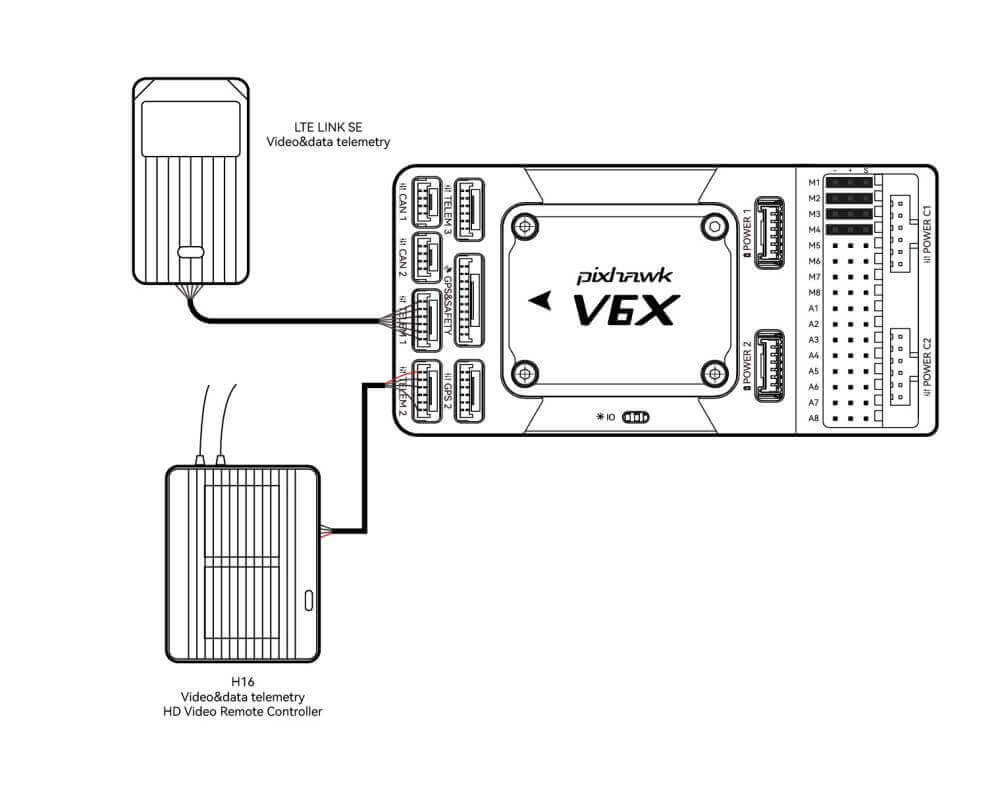
The image below shows how to connect the most important sensors and peripherals (except the motor and servo outputs). We’ll go through each of these in detail in the following sections.

Main interface
Function
POWER C1Please connect CAN PMU SE to this interface; this interface is connected to the UAVCAN power module
POWER C2Please connect CAN PMU SE to this interface; this interface is connected to the UAVCAN power module.
POWER 1Connect SMbus(I2C) power module
POWER 2Connect SMbus(I2C) power module
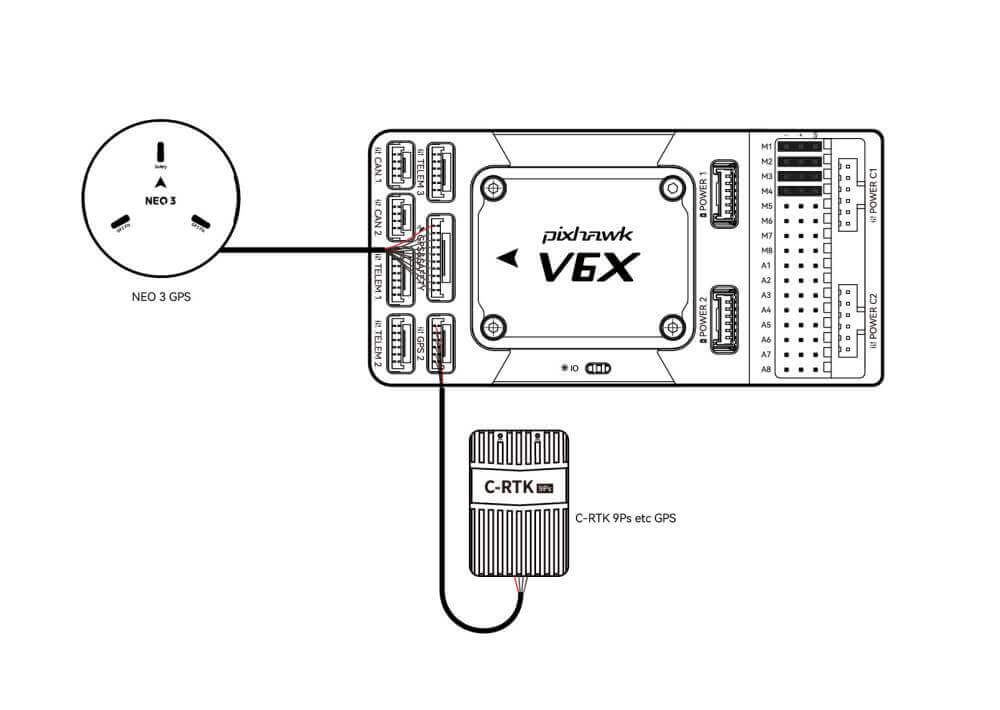
GPS&SAFETYConnect Neo series GPS/C-RTK 9PS, including GPS, safety switch, buzzer interface.
GPS2Connect the GPS/RTK module
UART 4Support user customization
TELEM1/TELME2/TELEM3Connect telemetry or MAVLink devices
TF CARDSD card for log storage (card pre-inserted in factory).
M1~M8PWM output from IO, connecting to ESC and Servo
A1~A8Form FMU can be defined as PWM/GPIO; supports Bdshot; used to connect camera shutter/hot shoe, servo, etc.
USBConnect to a computer for communication between the flight controller and the computer, such as loading firmware.
CAN1/CAN2Connect Dronecan/UAVCAN devices such as NEO3 Pro.
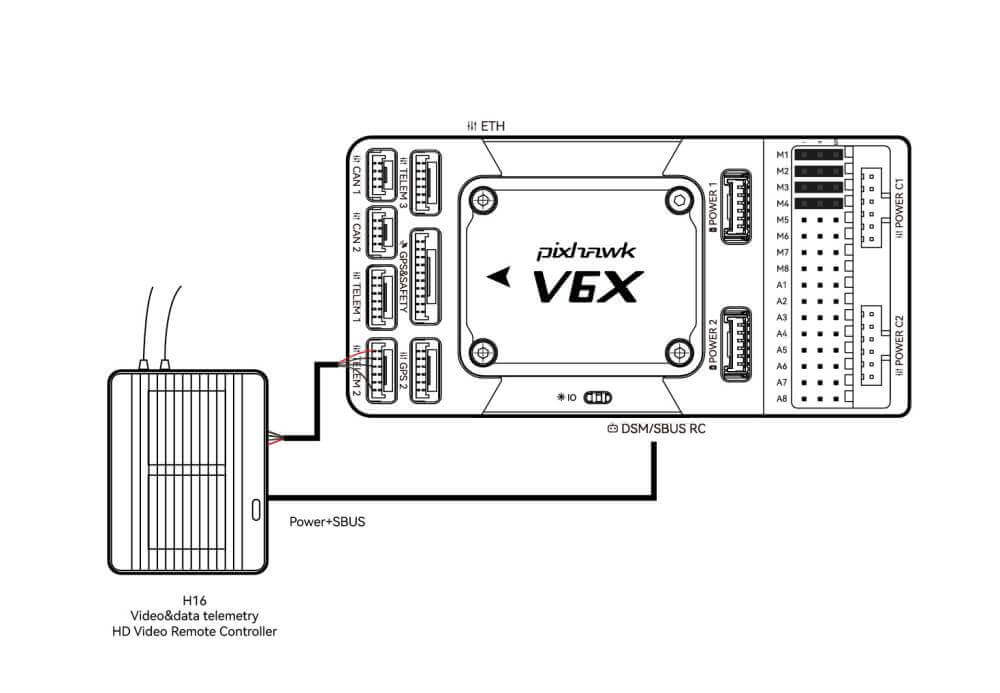
DSM/SUB/RSSIIncludes DSM, SBUS, RSSI signal input interface, DSM interface can be connected to DSM satellite receiver, SBUS interface to SBUS remote control receiver, RSSI for signal strength return module
PPMConnecting the PPM RC Receiver
ETHEthernet interface, you can connect Ethernet devices such as task computers.
AD&IOThere are two analog inputs (ADC3.3/ADC6.6); generally not used

Vehicle Front

 Note

If the controller cannot be mounted in the recommended/default orientation (e.g. due to space constraints) you will need to configure the autopilot software with the orientation that you actually used: The Controller Orientation.(for PX4 firmware, for Ardupilot firmware).

GPS

We recommend that you use Dronecan/UAVCAN GPS/RTK (such as Neo 3 pro); you only need to connect it to the CAN 1/2 interface; you can also use an ordinary GPS/RTK module; connect it to the GPS interface; it is commonly used now The GPS module generally integrates GPS, compass, safety switch, buzzer, and LED status light. The GPS module should be installed on the bracket and far away from other electronic devices. The installation direction is towards the front of the carrier (the NEO GPS arrow is in the same direction as the controller arrow)

Radio Control

It is recommended that, whether you fly manually or automatically, please connect the handheld remote control (it can be used as an emergency machine, unless you are not proficient in operating the handheld remote control).

  • For DMS/SBUS receivers, connect to the DSM/SBUS interface.
  • For PPM receivers, connect to the PPM interface.
  • For receivers of other protocols, please read Ardupilot Radio Control Systems.

Power

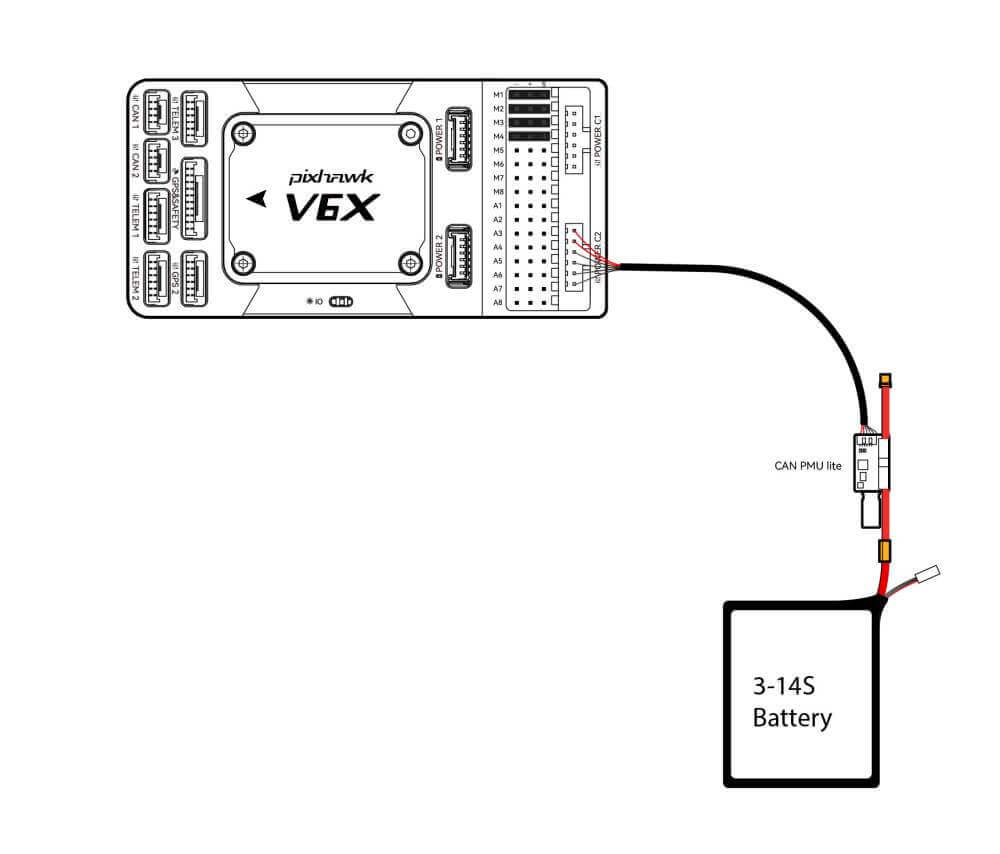
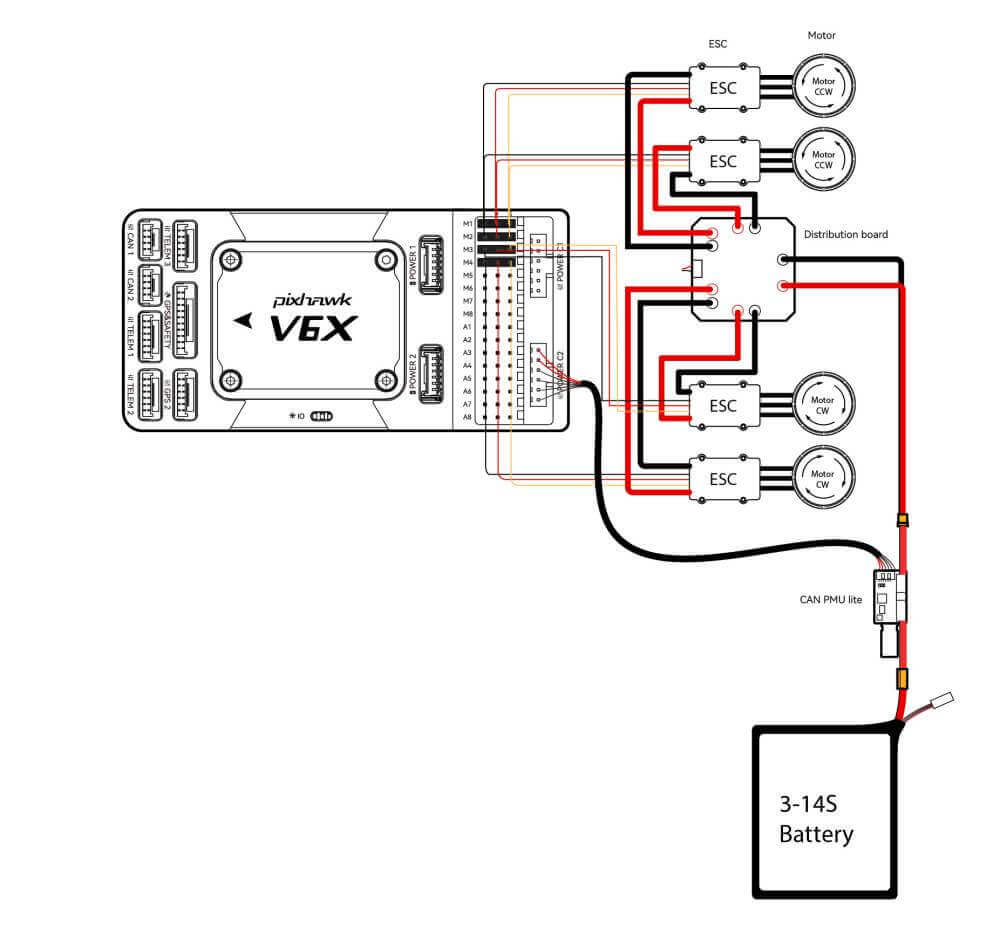
Pixhawk V6X® is equipped with a CAN PMU lite module, which supports a 3~14s lithium battery. Please connect the 6-pin connector of the module to the flight control Power C1 、Power C2 interface

 Tip

When the Pixhawk v6x runs Ardupilot, it’s plug-and-play and requires no additional setup; When running PX4, set it according to [Power Module Setup (PX4)] (px4-users-manual.md#pm).

Telemetry (Radio) system

Using the telemetry system, you can communicate with the drone through the ground station software. Monitor and control drones in flight. The airborne end of the telemetry system should be connected to the TELEM1/TELEM2/TELEM3 interface.

SD Card

The SD card is already installed on Pixhawk V6X® when it leaves the factory, so you don’t need to install it.

Motors/Servo

The motor/servo system is connected to the M1~M8/A1~A8 ports in the order specified for your carrier in the fuselage reference.

Servo power supply

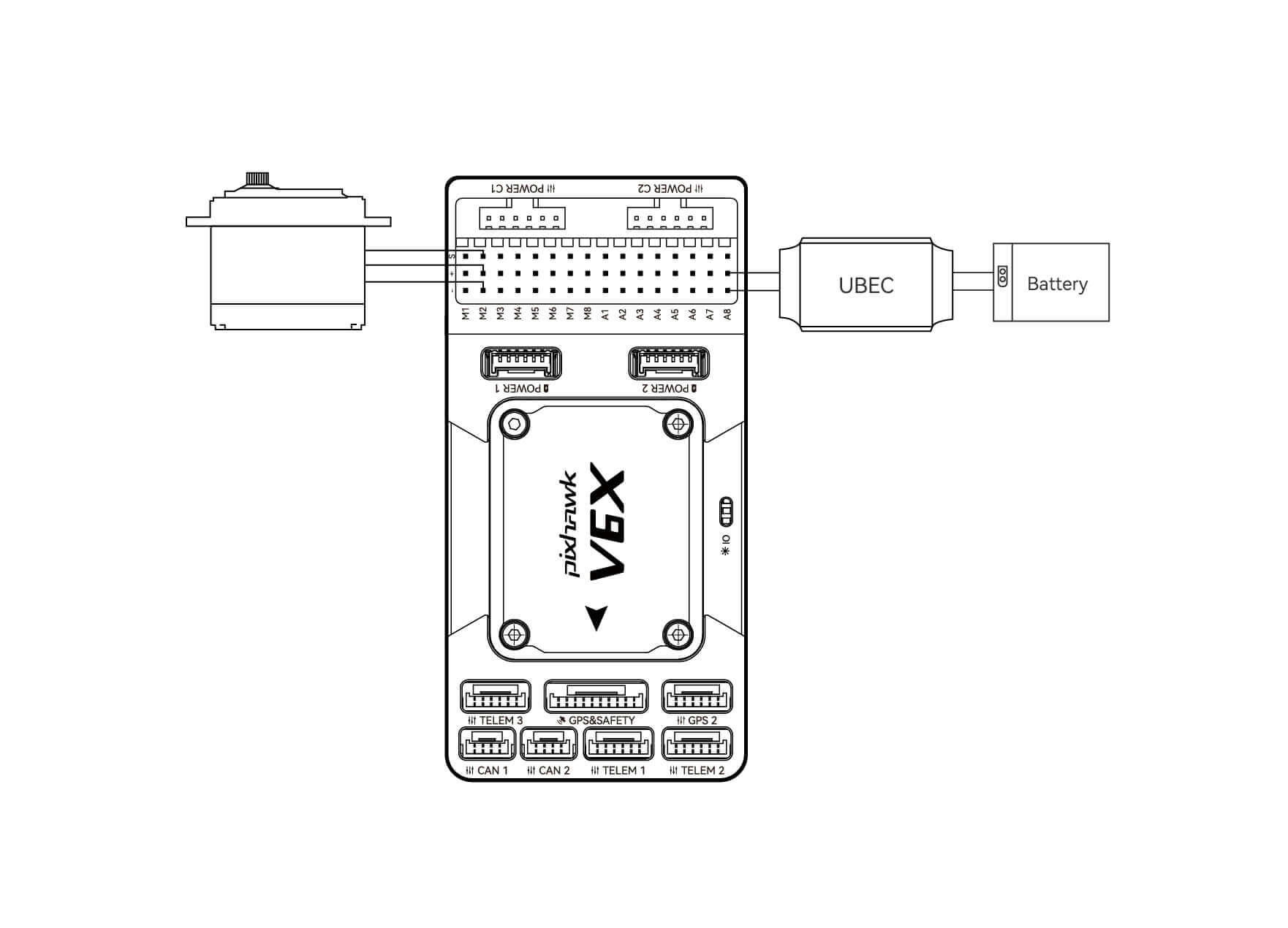
Pixhawk V6X® does not supply power to the servos. You need to use an external BEC to connect to the positive and negative ports of any one of M1~M8/A1~A8 to supply power to the servos.

Procurement/Purchasing Communication

Laura

E-mail:Laura@cuav.net

WhatsApp:(+86)18078814327

Tina

E-mail:Tina@cuav.net

WhatsApp:(+86)18122367332